
In smart highway projects, a common need is to quickly conduct a preliminary assessment of traffic flow conditions on a road segment, such as traffic volume and average speed. Another common scenario is to evaluate, at an early stage before project bidding, whether the accuracy of traffic sensing devices meets the required standards.
Traditional methods often rely on manually reviewing video footage as a baseline, recording vehicle passing times by hand, or using heavy professional platforms. For small teams and engineering consulting scenarios, these workflows are often costly, inflexible, and inefficient.
To address this need, LivableHub is developing a desktop tool for highway video-based traffic flow analysis:
TrafficInsight v0.3.0
This version is mainly designed to run locally on Windows and Apple Mac computers. It supports video import, mouse-based line drawing, vehicle detection, vehicle tracking, speed estimation, traffic volume statistics, Excel export, and annotated video output.
Software Positioning
The core goal of this tool is:
To convert ordinary road surveillance videos into verifiable and exportable traffic flow parameter results.The current version focuses on the following scenarios:
- Highway surveillance video analysis
- Urban road traffic volume statistics
- Vehicle speed estimation
- Passenger car / truck classification statistics
- Video analysis result review
- Traffic engineering research and scheme evaluation
This software is not simply a video player, nor is it just an object detection demo. It is designed around the actual workflow of traffic analysis.
Current Version Features
The current version already supports the following major features.
1. Video Import and Line-Based Analysis
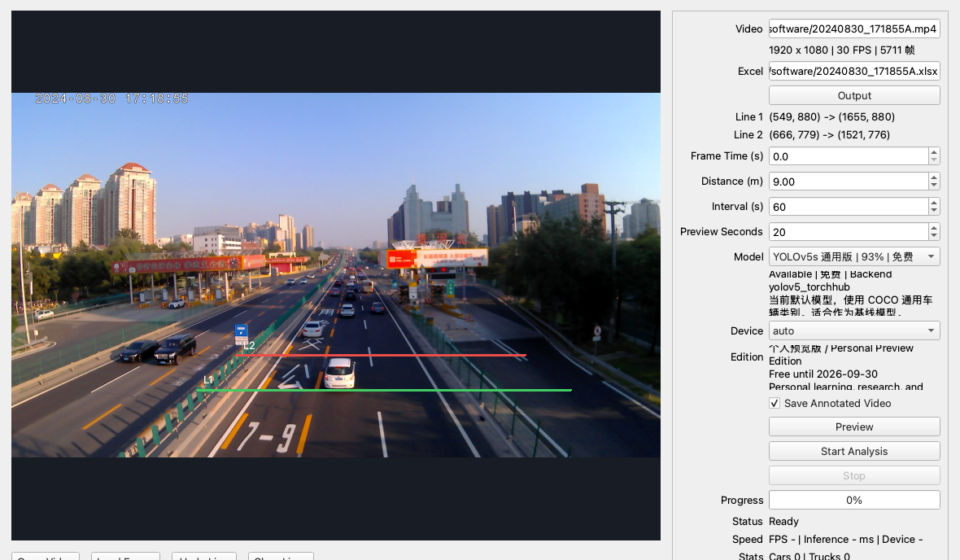
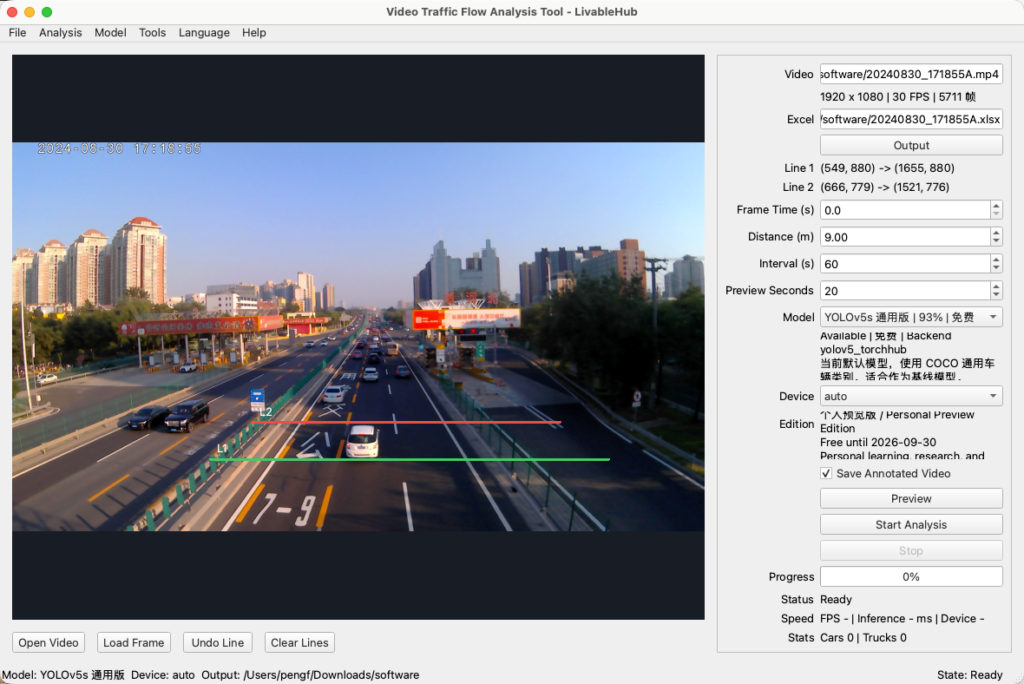
Users can open a local video file and directly draw two speed measurement lines on the video frame with the mouse.
After a vehicle passes through the two lines in sequence, the software estimates its speed based on the real-world distance entered by the user.
Compared with manually entering coordinates, mouse-based line drawing is more intuitive and better suited to real road video scenarios.
2. Preview Analysis
Before running a full analysis, users can first run a short preview analysis.
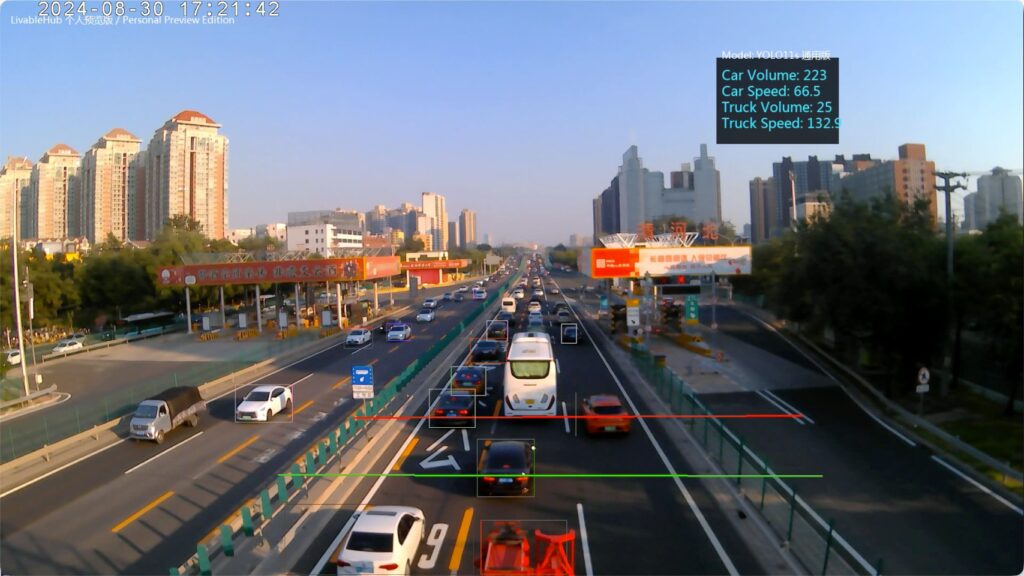
The preview analysis generates a video file with detection boxes, tracking trajectories, speed measurement lines, and statistical information, making it easier to check:
- Whether vehicles are correctly detected
- Whether the speed measurement lines are placed reasonably
- Whether missed detections or false detections occur
- Whether valid line-crossing records can be generated
- Whether the output video matches expectations
This step is very important in real-world use, because the line placement directly affects speed estimation and traffic volume statistics.
3. Full Video Analysis
After confirming the line placement and detection performance, users can run a full video analysis.
The software outputs:
- Excel statistical results
- Annotated video file
- Vehicle count statistics
- Passenger car / truck classification statistics
- Speed statistics
- Traffic flow parameters for each statistical interval
The current statistical interval is user-configurable, for example, one summary every 60 seconds.
4. Multi-Model Selection
The current version supports selecting different detection models.
The interface currently includes:
- YOLOv5s General Version
- YOLO11s General Version
- Reserved slot for a Highway-Specific Model
YOLOv5 is used as the default model, while YOLO11 is provided as a newer-generation model option. Future versions will further improve plug-and-play model capability, allowing the software to select more suitable detection models for different scenarios.
5. Apple Silicon Acceleration Support
On macOS devices, the current version already supports the PyTorch MPS backend, allowing inference acceleration with Apple Silicon chips.
Users can select the inference device in the interface:
- auto
- mps
- cpu
The auto option automatically selects the best available device.
6. Professional Qt Interface
The new version has migrated from the early PySimpleGUI interface to Qt / PySide6.
The current interface includes:
- File menu
- Analysis menu
- Model menu
- Tools menu
- Help menu
- Bottom status bar
- Model status display
- Output directory display
- Runtime status display
Compared with the early test version, the new interface is closer to a formal desktop application and is more suitable for future productization and commercial iteration.
Output Results
The current version mainly outputs two types of results.
Excel Result File
The Excel file is used to save statistical results, including vehicle counts and speed information within each statistical interval.
The software also writes analysis metadata, such as:
- Video file used
- Model used
- Inference device
- Speed measurement line coordinates
- Real-world distance
- Statistical interval
- Video frame rate
This makes it possible to review the conditions under which the results were generated later.
Annotated Video File
The annotated video preserves key visualization information during the analysis process, including:
- Detection boxes
- Tracking IDs
- Speed measurement lines
- Vehicle types
- Speed results
- Current model information
This is very important for judging whether the analysis results are credible.
If the Excel results look abnormal, the annotated video can be reviewed to determine whether the issue comes from line placement, camera angle, vehicle occlusion, or the detection model itself.
Current Version Information
Product Name: Video Traffic Flow Analysis Tool
Brand: LivableHub
Current Version: 0.3.0
Interface Framework: Qt / PySide6
Detection Models: YOLOv5 / YOLO11
Tracking Algorithm: ByteTrack
Output Formats: Excel / MP4
Current Platform: macOS/windows
Future Plans
LivableHub plans to continue working on the following directions:
- More professional model management
- Highway-specific detection model
- Licensing and version upgrade mechanism
- Web-based SaaS version
- Cloud video analysis service
- Mobile-assisted upload and result viewing
- More complete traffic flow parameter reports
Our goal is not to build a one-off script, but to gradually develop a lightweight professional tool for road video analysis.
Download Link
https://www.livablehub.com/?product=livablehub-%e4%ba%a4%e9%80%9a%e6%b4%9e%e5%af%9f-trafficinsight
About LivableHub
LivableHub is an independent brand focused on transportation, automobiles, livable lifestyle aesthetics, career development, and AI.
We aim to use computer vision, data analysis, and engineering-oriented software tools to transform hidden information in road videos into more intuitive, verifiable, and usable data results.
This project is still under active development. Please stay tuned for future version updates.